




The tCam App · iOS & Android
The tCam App. Your home, in your hand.
tCam is the free companion app for every RecorderGear WiFi camera. Live viewing from anywhere in HD, motion-activated push alerts, and recording to a local Micro SD card. Free on iPhone and Android, no subscription.

At a glance
What the tCam app does.
Your cameras, your alerts, your footage. One free app.
Motion alerts
Push notifications, anywhere
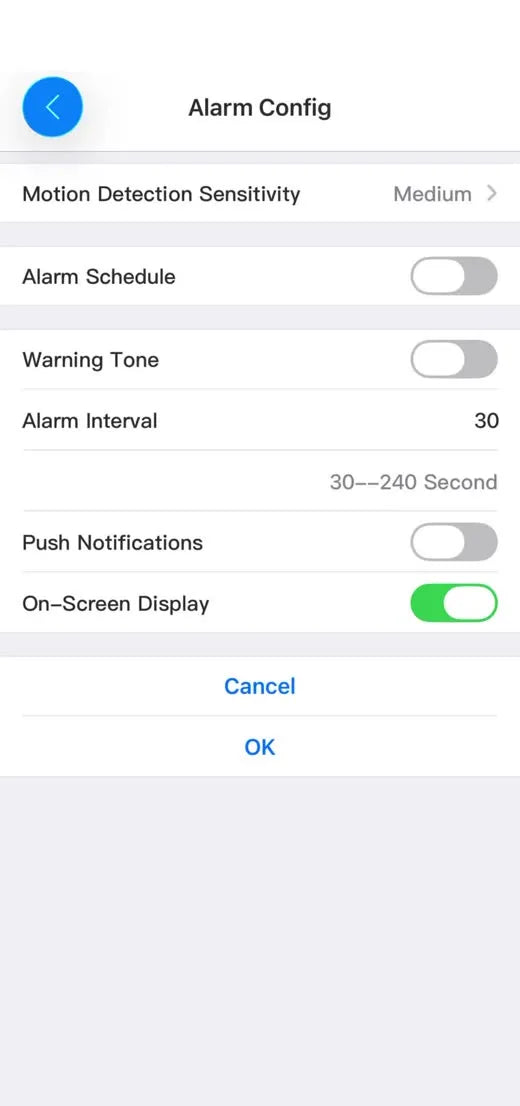
Motion detection with three sensitivity levels, scheduled watch windows, and a push notification the moment movement is detected.
Live view
From anywhere, in HD
Open the live feed in HD from any internet connection, whether you are at work or across the country.
Multi camera
Every camera in one app
Every camera appears on the My Device screen, and multi-view puts four live feeds side by side.
Local recording
To a Micro SD card
Footage records to the Micro SD card inside the camera, internet or not. Snapshots and clips you take save to your phone.
Motion alerts
Motion-activated alerts
Be alerted while you're away. When a camera detects motion, it sends a push notification to your phone and can record a clip of the event to its SD card.
Live view
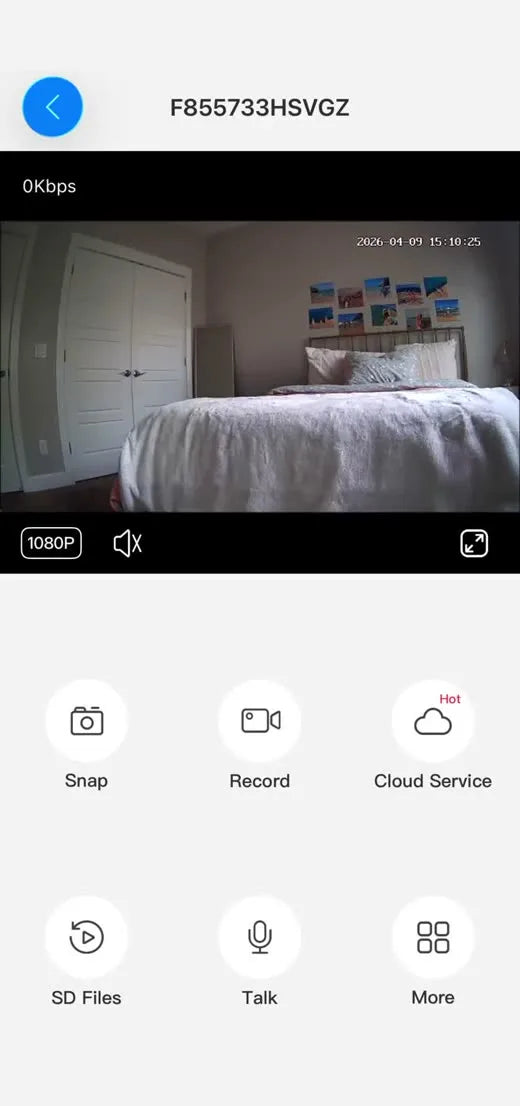
Look in live, from anywhere
Once the camera is on your home WiFi, opening the app shows you the room in real time, whether you are at work or across the country. A quality control sits right on the live screen, and the Snap and Record buttons capture the moment straight to your phone.

Multi camera
All of your cameras in one app
Add as many cameras as you need, name each one for its room, and see up to four live feeds on one screen.
Your whole home
Monitor all your spaces from one app
Put a camera in each space that matters to you. They all live in the same app, so checking the whole house is one screen, not five.
 LIVE
LIVE LIVE
LIVE LIVE
LIVE LIVE
LIVEHover a room to look inside it.Tap a room to look inside it.
Recording & storage
Recording works without the internet
Footage saves to a Micro SD card inside the camera. The internet is only needed to watch live and receive alerts; if your connection drops, recording continues. Browse everything on the card from the app, wherever you are.

Getting started
On your phone in about a minute.
Plug the camera in
Put it where you want it, plug it into power, and give it a minute to start up.
Add it in the app
Open tCam and it finds the camera. The app then puts the camera on your home WiFi, which is what lets you watch it from anywhere.
Tap it to watch
The camera now shows up on your home screen in the app. Tap it and you are looking at the room.
Step-by-step with real app screens, the full video walkthrough, and troubleshooting
Good to know
Common questions
Is there a subscription or monthly fee?
No. The app is free, the alerts are free, and your footage saves to a card you already own. An optional paid cloud backup exists inside the app, but nothing about the cameras requires it.
Does it need the internet to record?
No. Footage records to the Micro SD card inside the camera whether your internet is up or not. The connection is only needed for live viewing and motion alerts on your phone.
How many cameras can I add?
Add as many as you like. Each camera is a card on the My Device screen, and multi-view shows several rooms on one screen at the same time.
Where does my footage live?
Automatic recordings live on the SD card inside the camera, browsable from anywhere in SD Files. Snaps and clips you take while watching live save to the app on your phone, ready to share.
Does it work on my phone?
tCam is free on iPhone via the App Store and on Android via Google Play.
Which cameras use this app?
Every RecorderGear WiFi camera: the RG50 USB Charger Camera, the RG80 Charging Station Camera, and the RG200 Digital Clock Camera.
4.7 average
2,600+
verified reviews
Read the reviews →
The cameras it comes with
Pick your camera, the app is included.

Most compact · entryways and offices
RG50 USB Charger Camera
A WiFi monitoring camera built into a fully functional USB charging block. It keeps charging phones while it streams, on wall power around the clock.

Five USB ports · shared spaces
RG80 Charging Station Camera
A WiFi monitoring camera built into a working charging station with three USB-A and two USB-C ports, for the rooms where everything charges.

Night vision · overnight rooms
RG200 Digital Clock Camera
A WiFi monitoring camera built into a functional digital bedside clock. Infrared night vision sees clearly up to 20 feet in complete darkness.