




 Applies to: SL100 Voice Recorder Pen →
What these three settings do
Three settings control how the SL100 voice recorder pen captures audio. Voice activation determines when the pen records: it listens for sound above a set threshold and pauses during silence, keeping files free of empty gaps and saving memory. It does not change battery life: that is set by the recording quality mode, about 13 hours in PCM and up to 20 hours in HQ, whether voice activation is on or off. Recording quality determines how clearly audio is captured, from broadcast-grade PCM for professional interviews to efficient HQ for long lectures on a single charge. Microphone sensitivity determines how far the pen hears, which matters when a speaker is across a conference table or when background noise needs to be filtered out.

Key Takeaways
- Voice activation decides when the SL100 records. It saves memory and review time, but it does not change battery life.
- Battery life depends on the quality mode: about 13 hours in PCM, 16 in XHQ and up to 20 in HQ.
- On the 4GB memory, PCM holds about 12 hours, XHQ 72 hours and HQ 144 hours.
- Five voice activation levels run from about 52 dBA to about 64 dBA, and microphone sensitivity sets how far the pen hears.
The RecorderGear SL100 voice recorder pen has three settings: voice activation decides when it records, the quality mode (PCM, XHQ or HQ) decides how clearly and for how long, and microphone sensitivity decides how far it hears.
1. Voice Activation: Recording Only What Matters
What is Voice-Activated Recording?
Voice-activated recording is a smart feature that automatically starts recording when it detects sound and pauses when there is silence. This allows the pen to capture only the audio that matters.
It works similarly to a motion-activated light that only turns on when someone enters the room, saving energy. The SL100 does the same thing with sound, saving memory space by not recording long, empty silences.
Voice activation has two advantages:
- Saves Storage Space: By skipping periods of silence, you can fit much more important audio onto the pen's 4GB of built-in memory.
- Makes Review Easier: You won't have to listen through hours of silence to find the important parts of a conversation, making your review process faster and more efficient.
A Word of Caution: In very quiet environments, voice activation may miss important soft sounds. For critical recordings where every detail matters, we recommend turning this feature off and using continuous recording mode.
How to Choose the Right Sensitivity Level
The SL100 features 5-level voice activation, which lets you decide how loud a sound needs to be to trigger a recording. The SL100 manual lists each level as an approximate sound level in dBA. For reference, the National Institute on Deafness and Other Communication Disorders lists normal conversation at 60 to 70 dBA, so the middle settings respond to ordinary speech and the least sensitive setting waits for louder, closer voices.
Think of it like deciding how loudly someone must speak before you start taking notes. Should a soft question from the back row count, or only the speaker at the front? These five levels give you that same control over your recordings, helping you avoid capturing unwanted background noise.
Voice Activation Sensitivity Levels
| Level | Best For This Environment | Simple Explanation |
|---|---|---|
| +2 | A very quiet room, like a library or a private office. | Very Sensitive. This level will start recording on very soft speech (around 52 dBA). |
| +1 | A quiet room with minimal background noise. | Sensitive. Good for capturing clear, quiet conversations without much ambient sound (around 55 dBA). |
| 0 | A typical room with normal conversation levels. | Normal. This is a balanced, default-like setting for most everyday recording situations (around 58 dBA). |
| -1 | A slightly noisy environment, like a moderately busy cafe. | Insensitive. Requires a louder sound to begin recording, helping to ignore low-level chatter (around 61 dBA). |
| -2 | A loud environment with significant background noise. | Very Insensitive. This level will only trigger on loud, clear sounds, ignoring most background noise (around 64 dBA). |
Feel free to test a few different settings to find the one that works best for your specific needs and environment.
Now that you understand how to control when your pen records, let's explore the different options for how it records the audio.
2. Recording Quality: Finding the Perfect Balance
Understanding the Three Quality Modes
The SL100 offers three recording quality modes: PCM, XHQ, and HQ. Choosing between them is simply a matter of balancing audio detail with file size: how much clarity you need versus how much recording time you want to store.
A great way to understand this is to compare the modes to digital photo resolutions:
- PCM (705kbps): This is like a professional photographer's RAW file. It captures every detail as uncompressed audio: the Library of Congress describes linear PCM as uncompressed, while MP3 is compressed. It's perfect for broadcast or professional interviews where maximum fidelity is essential, but it creates very large files.
- XHQ (128kbps): This is like a high-quality JPEG photo. It offers excellent, premium clarity that is perfect for most important meetings, lectures, and conversations.
- HQ (64kbps): This is like a standard JPEG photo. The quality is still clear and balanced, making it great for everyday notes and long lectures, while using the least amount of storage space.
Which Quality Mode Should I Use?
| Mode | Best For... | Storage Impact (on 4GB) | Battery Life (Continuous) |
|---|---|---|---|
| PCM | Broadcast-quality interviews or professional content creation | 12 hours | Up to 13 hours |
| XHQ | Premium clarity in important meetings and conversations | 72 hours | Up to 16 hours |
| HQ | Maximum recording time for lectures or all-day notes | 144 hours | Up to 20 hours |
Finally, let's look at a setting that works hand-in-hand with these modes: Microphone Sensitivity.
3. Microphone Sensitivity: Adjusting Your Pen's "Hearing"
What is Microphone Sensitivity?
Microphone sensitivity is like adjusting the "hearing range" of your pen. This setting tells the microphone how far away it should try to pick up sounds. You can fine-tune it based on the size of the room and how close you are to the sound source.
The SL100 has three distinct levels to choose from:
- High: Best for capturing soft or distant voices. Use this setting when you need to record a speaker in a large room.
- Middle: This is the default setting, offering a balanced range that works well for most normal, nearby conversations.
- Low: Ideal for loud voices or very close-up recording. This setting helps prevent the audio from becoming distorted or muffled when the sound source is very strong.
Microphone Sensitivity vs. Voice Activation Sensitivity
It's easy to confuse these two settings, but they control very different things. Here is a simple way to remember the difference:
Microphone Sensitivity is about how far the pen can hear. Voice Activation Sensitivity is about how loud a sound must be to start a recording.
Putting It All Together: A Practical Example
Imagine you're in a large lecture hall. The professor speaks softly and there's some background chatter from other students. Here's how you'd use your toolkit to get the best recording:
- Recording Quality: Choose XHQ for a good balance of clear audio and reasonable file size.
- Microphone Sensitivity: Set it to High to ensure you pick up the professor's distant voice clearly.
- Voice Activation: Set the sensitivity to -1 or -2. This tells the pen to ignore the low-level background chatter and only trigger recording when the professor is actually speaking.
Responsible use. Recording laws vary by state. Let people know when you are recording, and get consent where the law requires it. Read our guide to one-party vs. all-party consent recording laws.
4. Recording with Confidence
You now have the tools to control not just when your pen records (Voice Activation), but also how it records (Recording Quality) and from how far away (Microphone Sensitivity).
By mastering these simple but powerful features, you have complete control over your audio. This ensures you can reliably capture clear recordings in any environment. With this knowledge, your SL100 voice recorder pen delivers professional-grade audio capture in a writing instrument you carry every day. To have it start on its own at the same time each day, see our SL100 scheduled recording guide.
Frequently Asked Questions
Does voice activation make the SL100 battery last longer?
No. Battery life is set by the quality mode, about 13 hours in PCM and up to 20 hours in HQ, whether voice activation is on or off.
Which quality mode should I use for lectures?
HQ gives the most recording time: 144 hours on the 4GB memory and up to 20 hours per charge. Choose XHQ when you want more clarity for an important meeting.
How do I change the SL100 settings?
Voice activation, quality mode and microphone sensitivity are set in the free RecorderGear setup software, which runs on Mac and Windows.
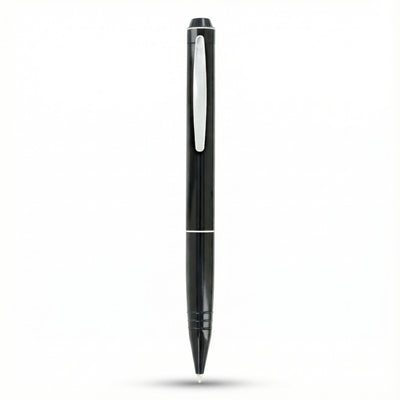
 SL100
 FD50